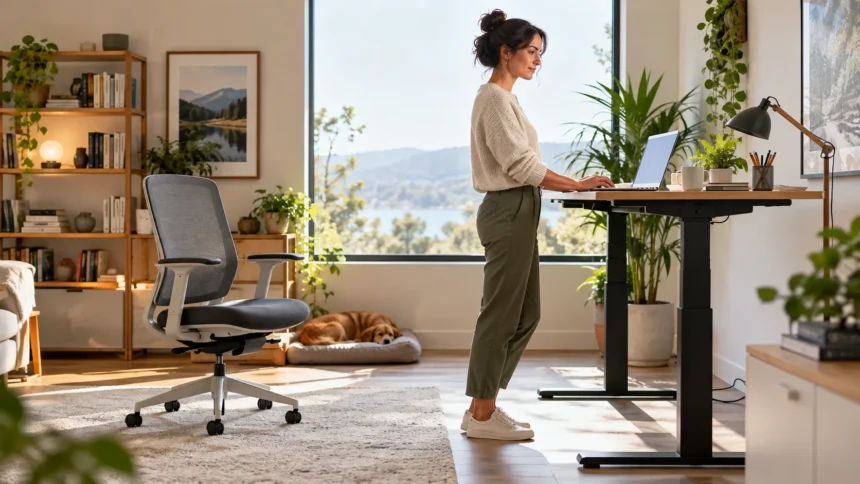
Is Standing Better Than Sitting for Everyday Health?
Standing is not automatically better than sitting in every situation. Both positions can be comfortable and useful when used in moderation, but staying in either posture for long periods may lead to stiffness or discomfort. The bigger issue is usually prolonged inactivity rather than whether your body is technically sitting or standing during work, study, or leisure.
Sitting for many hours can reduce opportunities for movement throughout the day, especially when work requires long periods at a desk. Standing may encourage slightly more muscle activity and make it easier to change position. However, remaining completely still while standing does not provide the same benefits as walking, stretching, or performing regular physical activity.
A more practical approach is to alternate between sitting, standing, and moving whenever possible. Your body generally responds better to varied positions than to maintaining one posture for several uninterrupted hours. Short walking breaks, gentle mobility exercises, and position changes can make a greater difference than simply replacing every seated task with standing.
What Happens to Your Body When You Sit Too Long?
Long periods of sitting can make the hips, lower back, shoulders, and neck feel stiff, particularly when posture remains unchanged. Desk work often encourages people to lean forward, round their shoulders, or keep their hips and knees in the same position for extended periods. These habits may contribute to temporary muscle tightness or general discomfort.
Sitting also requires relatively little muscular effort compared with moving around. When several hours pass without standing or walking, your overall daily movement can become quite low. This is why people who work at desks may benefit from intentionally adding short activity breaks rather than assuming that one workout automatically replaces all movement missed during the day.
The chair itself can influence how sitting feels. A supportive chair, comfortable desk height, and properly positioned screen may reduce unnecessary strain compared with an awkward workstation. Even with an excellent setup, however, changing position periodically remains important because the body is designed to move rather than stay perfectly still for an entire workday.
What Happens When You Stand for Long Periods?
Standing requires more postural muscle activity than sitting, which is one reason standing desks have become popular. It can also make it easier to shift weight, stretch, or begin walking without leaving a workstation completely. Still, standing continuously can create its own problems, especially when someone remains nearly motionless for several hours.
Long periods on your feet may lead to tired legs, aching feet, or discomfort around the lower back. Hard flooring and unsupportive shoes can make these symptoms more noticeable. Leaning heavily on one leg or locking the knees may also create an uneven standing position that becomes uncomfortable over time.
The goal should therefore not be to stand all day simply because sitting has disadvantages. Alternating postures usually makes more sense than replacing one prolonged position with another. Standing can be a useful part of a healthier routine when combined with sitting, walking, stretching, and other forms of regular movement.
Is Standing Better Than Sitting for Your Back?
Some people feel less back discomfort when they stand periodically because changing position reduces the amount of time spent with the hips flexed in a chair. Standing may also encourage a more upright trunk position when the workstation is set up correctly. However, it is not guaranteed to improve back discomfort for everyone.
Standing with poor posture can still place unnecessary stress on the lower back. Excessive arching, leaning forward, shifting onto one hip, or using a work surface that is too low can make standing uncomfortable. Maintaining a relaxed posture and changing positions regularly is generally more useful than trying to hold a perfectly rigid stance.
If your back begins hurting in either position, the solution may involve more than simply changing from sitting to standing. Workspace ergonomics, movement habits, strength, sleep, previous injuries, and other factors may contribute. Persistent, severe, or worsening pain should be discussed with an appropriate healthcare professional rather than managed solely through desk adjustments.
Can Standing Help Improve Posture?
Standing can provide an opportunity to reset posture after sitting for a long time, especially if you have been slouching or leaning toward a screen. It allows the hips and knees to move out of a prolonged seated position. However, simply standing upright does not automatically produce healthy posture or correct existing movement habits.
Good standing posture should feel comfortable rather than forced. Keep your head balanced over your shoulders, allow your knees to remain relaxed, and distribute your weight naturally between both feet. Avoid pulling your shoulders excessively backward or tightening your abdominal muscles constantly, since an overly rigid posture can become tiring.
Movement is often more important than trying to find one perfect posture. Small changes in position, brief stretches, and walking breaks can reduce the amount of time spent loading the same muscles and joints. Think of posture as something that changes throughout the day rather than a single position you must maintain perfectly.
Sitting vs Standing at a Desk
A sit-stand desk can be useful because it gives you more options during the workday. Instead of remaining seated through emails, meetings, research, and writing, you can complete certain tasks while standing. The ability to switch positions conveniently may make movement breaks easier to remember and more practical during a busy schedule.
Start gradually if you are not accustomed to standing while working. Standing for very long periods immediately may lead to foot or leg fatigue, which can make the new setup feel uncomfortable. Try shorter standing sessions and adjust based on how your body responds rather than aiming for a specific number of hours from the beginning.
Desk height also matters in both positions. Your keyboard, mouse, monitor, and work surface should be arranged so you are not constantly reaching, bending, or looking sharply downward. A sit-stand desk works best when both the seated and standing setups are comfortable enough that changing positions does not introduce a different source of strain.
How Often Should You Switch Between Sitting and Standing?
There is no single switching schedule that works perfectly for everyone. Your ideal routine may depend on your job, comfort, fitness, workstation, and whether certain tasks are easier while seated or standing. Instead of focusing on an exact ratio, pay attention to how long you remain completely still in any one position.
Changing position every so often can prevent stiffness from building unnoticed. You might stand during a phone call, walk after finishing a task, or sit again when your legs begin to feel tired. These small adjustments can accumulate throughout the day without requiring a complicated routine or significantly interrupting productivity.
Movement breaks do not need to be long to be useful. Walking to refill water, stretching the hips, moving the shoulders, or taking a brief lap around the room can help break up sedentary time. The goal is to make regular movement part of your normal workday instead of treating it as something separate.
Why Movement Matters More Than Perfect Posture
People often search for the best sitting or standing posture, but the human body is capable of using many comfortable positions. Problems are more likely to develop when one position is maintained for too long without variation. Changing posture distributes physical demands across different muscles and joints rather than repeatedly loading the same areas.
Walking is one of the simplest ways to interrupt prolonged sitting or standing. Even short periods of movement allow the hips, knees, ankles, spine, and shoulders to move through different ranges. Regular daily walking also provides physical activity that standing alone cannot replace, making it an important part of a balanced routine.
Mobility can also support comfortable movement around the hips and lower body. If you spend a large amount of time at a desk, learning more about hip mobility can help you understand how the joint moves in different directions. Gentle mobility work may complement regular position changes and general physical activity.
Simple Ways to Sit More Comfortably
Start by adjusting your chair so your feet can rest comfortably on the floor or on a stable foot support. Your knees and hips should feel relaxed rather than compressed into an awkward position. The chair should also allow you to reach your keyboard and mouse without constantly lifting your shoulders or stretching your arms forward.
Position your monitor so you can view it without repeatedly bending your neck downward. Laptop users may benefit from raising the screen and using a separate keyboard and mouse when working for long periods. Small ergonomic changes can make a workstation more comfortable, but they should still be combined with regular breaks and movement.
Avoid thinking that you must remain perfectly upright every minute. Shifting slightly, leaning back, changing leg position, or standing occasionally can all provide useful variation. Comfort usually comes from having several acceptable positions available rather than forcing your body into one posture for the entire day.
Simple Ways to Stand More Comfortably
When working while standing, begin with your feet comfortably apart and your weight distributed naturally. Keep your knees relaxed instead of locking them completely straight. Changing your stance occasionally or placing one foot briefly on a low support can help prevent the standing position from becoming overly rigid.
Supportive footwear may improve comfort, particularly when standing on hard surfaces. Some people also prefer an anti-fatigue mat because it provides a slightly softer surface beneath the feet. These accessories can make standing more pleasant, but they do not eliminate the need to sit or move when your legs become tired.
Your standing desk should allow your arms to remain comfortable while typing. If the work surface is too high, your shoulders may rise; if it is too low, you may lean forward. Adjust the monitor independently when possible so your head and neck remain in a relaxed position while you work.
Signs You May Need to Change Position
Discomfort is often one of the clearest signals that you have remained in one position too long. You may notice stiffness in your hips, tension in your neck, tired feet, or an aching lower back. These sensations do not always indicate a serious problem, but they can remind you that your body would benefit from movement.
Numbness, tingling, or repeated discomfort should not simply be ignored in an effort to maintain a standing or seated routine. Try changing position, walking briefly, and reviewing your workspace setup. If symptoms continue, become severe, or interfere with normal activities, professional medical guidance may be appropriate.
Fatigue can also affect posture without you realizing it. As muscles become tired, you may start leaning on one side, collapsing forward, or placing excessive pressure through your arms. Regular breaks can help you reset before these compensations become uncomfortable, making work feel easier toward the end of the day.
Can a Standing Desk Replace Exercise?
A standing desk should not be considered a substitute for exercise. Standing uses more postural activity than sitting, but it does not provide the cardiovascular, strength, mobility, or endurance benefits associated with purposeful physical activity. You can still have a very inactive day even if several hours are spent standing at a desk.
Regular exercise can include walking, cycling, resistance training, sports, mobility work, or other activities appropriate for your abilities and preferences. The best approach is usually one you can maintain consistently rather than an overly complicated plan. Standing during work can complement these habits by helping reduce long uninterrupted periods of sitting.
Think of a sit-stand workstation as one tool within a broader movement routine. It can provide variety and make it easier to change positions during work, but daily physical activity remains important. Combining exercise with walking breaks and comfortable workstation habits creates a more balanced approach than depending on standing alone.
How to Build a Better Workday Movement Routine
Begin by identifying periods when you typically sit without moving for long stretches. Meetings, writing sessions, gaming, studying, or administrative work can easily keep you in the same position longer than expected. Once you recognize these patterns, you can attach simple movement habits to natural transitions throughout your day.
For example, stand during certain calls, walk for a few minutes after lunch, or change position whenever you finish a major task. These habits are easier to maintain when connected to activities you already perform. You do not need elaborate exercises every hour; consistent small movements can make the workday feel less physically repetitive.
Keep the routine flexible rather than forcing yourself to follow strict rules. Some days you may prefer more sitting, while other days standing may feel comfortable for longer periods. Listening to fatigue and discomfort allows you to adjust naturally while still avoiding the bigger problem of remaining inactive for hours at a time.
Conclusion
So, is standing better than sitting? Standing can provide a useful break from prolonged sitting, but it is not automatically healthier when performed continuously for many hours. Both positions can become uncomfortable when maintained without movement, which is why variety should be the main goal rather than choosing one posture exclusively.
A balanced workday might include sitting for focused tasks, standing during calls or shorter activities, and walking during regular breaks. Comfortable ergonomics can support both seated and standing positions, but no workstation setup replaces the value of movement. Your body generally benefits most when it has frequent opportunities to change position.
Start with realistic adjustments instead of trying to stand throughout the entire day. Alternate positions, improve your workspace, take short walking breaks, and include regular physical activity outside your desk routine. If persistent pain, numbness, or other concerning symptoms develop, consider seeking individualized advice from a qualified healthcare professional.
FAQs
Is standing all day healthier than sitting?
Not necessarily. Standing continuously can cause foot, leg, and back fatigue just as prolonged sitting can create stiffness. Alternating between sitting, standing, and moving is generally more practical.
How long should I stand at my desk?
There is no universal amount that suits everyone. Start with comfortable periods, switch positions before significant fatigue develops, and include short walking or movement breaks throughout your workday.
Does standing burn more calories than sitting?
Standing generally requires slightly more muscular activity than sitting, but the difference is relatively small. Walking and purposeful exercise provide much greater physical activity benefits than simply standing still.
Can standing reduce back pain?
Some people feel more comfortable after changing from sitting to standing, but results vary. Poor standing posture can also cause discomfort, so persistent or worsening back pain should be professionally evaluated.
Is a standing desk worth using?
A standing desk can be useful if it helps you vary your posture and reduce uninterrupted sitting. Its main benefit is flexibility, not the idea that standing should replace sitting completely.