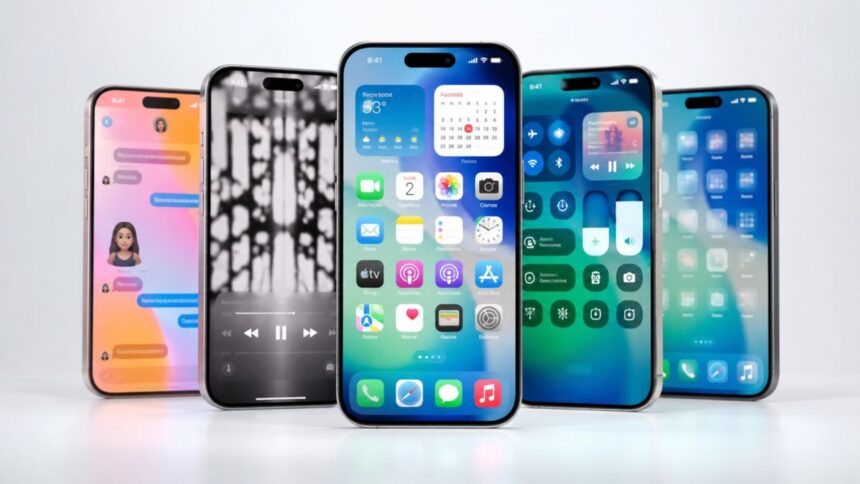
iOS 26 is one of the most noticeable iPhone software updates Apple has released in recent years. It changes how the operating system looks, improves communication tools, expands Apple Intelligence, and adds practical features to apps people use every day. The update is not simply a visual redesign; it also changes how users manage calls, translate conversations, search on-screen content, navigate journeys, and organize personal information.
The headline change is Liquid Glass, a translucent design system used across menus, controls, notifications, app icons, and navigation bars. However, the complete iOS 26 features list goes much further. Call Screening can collect information from unknown callers, Hold Assist can wait on customer-service calls, Messages can create polls, and Visual Intelligence can search or explain content displayed on the iPhone screen.
Apple has continued improving the operating system since its original release. As of July 2026, iOS 26.5.2 is the latest public version, while iOS 26.6 has reached the release-candidate testing stage. Updates released during the iOS 26 cycle have added encrypted RCS messaging support, more Liquid Glass controls, Apple Music tools, accessibility improvements, new emoji, and important security fixes.
This guide explains the most useful iOS 26 new features in simple language. It covers the visual redesign, Apple Intelligence updates, Phone and Messages improvements, Camera and Photos changes, Apple Music features, Maps upgrades, CarPlay tools, device compatibility, and newer additions introduced through iOS 26.5. Some features depend on the iPhone model, language, carrier, or region, so availability may differ between users.
What Is iOS 26 and Why Did Apple Change the Name?
iOS 26 is the operating system generation that followed iOS 18. Apple changed its naming approach so software versions across its product range could follow a shared year-based identity. This means iOS, iPadOS, macOS, watchOS, tvOS, and visionOS can carry matching version numbers, making it easier to understand which software releases belong to the same generation.
The update became publicly available in September 2025 and introduced changes across the Home Screen, Lock Screen, system apps, communication tools, entertainment services, and artificial intelligence features. Apple positioned it as both a design update and a practical improvement to the features iPhone owners regularly use, including Phone, Messages, Camera, Photos, Maps, Music, Wallet, and CarPlay.
Unlike a small maintenance release, iOS 26 changes the appearance of nearly every part of the iPhone. Buttons respond more dynamically, menus appear layered over content, and navigation elements shrink or expand depending on what the user is doing. Apple has still kept familiar gestures and layouts in many places, reducing the learning curve for people upgrading from an earlier iOS version.
The update also marks a larger move toward context-aware software. Apple Intelligence can understand on-screen information, provide live translations, improve Shortcuts, create images, and extract useful details from messages or emails. Although these AI tools receive significant attention, many of the most useful iOS 26 updates—such as spam filtering and redesigned Photos navigation—do not require advanced AI hardware.
Liquid Glass Gives iOS 26 a Completely New Look
Liquid Glass is the most visible change in iOS 26. It is a translucent digital material that reflects, refracts, and reacts to the content behind it. Apple applies the effect to navigation bars, buttons, sliders, notifications, widgets, app icons, and system controls, creating greater visual consistency across the iPhone and other Apple devices.
Navigation bars in apps such as Apple Music, Podcasts, and News can shrink while the user scrolls down, leaving more room for content. They expand again when the user scrolls upward or taps the navigation area. Search has also been moved closer to the bottom in several apps, making it easier to reach on larger iPhone screens without changing how people normally hold their phones.
App icons now support light, dark, tinted, and clear appearances. Users can create a minimal transparent Home Screen, choose a consistent colour theme, or allow icons to adapt to system appearance. Widgets use the same design language, helping the Home Screen feel more connected instead of appearing like a collection of unrelated design elements.
Some users found the original transparent appearance difficult to read, so iOS 26.1 added a tinted Liquid Glass option with greater opacity. Later updates introduced more controls for adjusting the appearance of the Lock Screen clock and improving Reduce Motion behaviour. These additions give users more flexibility when balancing visual style, readability, and accessibility.
Lock Screen and Home Screen Customization Feels More Personal
The iOS 26 Lock Screen uses Adaptive Time, allowing the clock to resize according to the wallpaper, notifications, and Live Activities. Instead of permanently covering the main subject of a photograph, the clock can adapt to the available space. This creates a cleaner result when using portraits, pets, landscapes, or family photos as a wallpaper.
Spatial scenes add a three-dimensional effect to suitable photographs. When the user moves the iPhone, different layers of the image appear to shift, creating a sense of depth. The effect uses computer vision to separate the main subject from the background, meaning older two-dimensional photographs can sometimes be turned into more dynamic Lock Screen scenes.
The Home Screen benefits from the new app-icon styles and refreshed widgets. Clear icons allow more of the wallpaper to remain visible, while dark and tinted styles give users greater control over the overall theme. These options are particularly useful for people who prefer a simple layout or want their Home Screen to match a specific colour palette.
Music playback also feels more connected to the Lock Screen. Supported songs can display animated album artwork that interacts with playback controls and fills more of the screen. This is a visual rather than essential improvement, but it demonstrates how Liquid Glass, media controls, wallpapers, and app content have been designed to feel like parts of one system.
Apple Intelligence Becomes More Useful Across the iPhone
Apple Intelligence in iOS 26 is more deeply integrated into apps and everyday actions. It supports Writing Tools, notification summaries, natural-language photo searches, Image Playground, Genmoji, Visual Intelligence, Live Translation, smarter Reminders, order tracking, and intelligent actions in Shortcuts. The aim is to place AI tools inside familiar workflows rather than requiring users to open a separate chatbot.
Genmoji offers more creative control by allowing users to combine existing emoji, descriptions, and personal characteristics. Expressions can be adjusted, while hairstyles and facial details can be changed for creations based on people in the Photos library. Image Playground also provides additional visual styles, helping users create conversation backgrounds, illustrations, and personalised images.
Shortcuts receives one of the most powerful improvements. Intelligent actions can summarize text, create images, organize information, and send results into the next step of an automation. The “Use Model” action allows a shortcut to process information with an Apple Intelligence model or use ChatGPT when broader knowledge or different capabilities are needed.
Apple Intelligence is not available on every device that supports iOS 26. It requires iPhone 15 Pro models or iPhone 16 and later, along with adequate free storage and supported language settings. Apple states that many tasks are processed on the device, while more complex requests may use Private Cloud Compute without permanently storing the information sent for processing.
Visual Intelligence Can Understand What Is on Your Screen
Visual Intelligence is no longer limited to identifying objects through the iPhone camera. In iOS 26, users can activate it while viewing content inside an app by pressing the same buttons normally used to take a screenshot. They can then search, highlight, identify, summarize, translate, or ask questions about selected information displayed on the screen.
For example, a person looking at a product in a social-media post can search for similar items through supported shopping or search apps. Someone viewing an unfamiliar object can ask ChatGPT to explain it, while text displayed in an image can be translated, summarized, or read aloud. Users remain in control of whether they save or share the screenshot.
The system can also identify event details on posters, invitations, and digital flyers. It can extract information such as the event name, date, time, and location, then prepare a Calendar entry. This removes the need to switch between apps and manually type each detail, making the feature especially useful for appointments, conferences, concerts, and social events.
Visual Intelligence may become one of the most practical iOS 26 AI features because it works with content people are already viewing. Rather than asking users to describe an object or copy text into another application, it provides tools directly where the information appears. However, users should still verify important dates, prices, health information, and other details generated or interpreted by AI.
Live Translation Breaks Down Language Barriers
Live Translation is integrated into Messages, FaceTime, Phone, and supported AirPods experiences. In Messages, incoming texts can be translated automatically, including messages sent within group conversations. Users can write a response in their preferred language, and the recipient can receive it in the selected translated language.
FaceTime provides translated captions while participants continue hearing each other’s original voices. This preserves the natural sound of a conversation while helping people understand what is being said. It can be valuable for international families, multilingual teams, travellers, students, and people communicating with customers or colleagues who speak another supported language.
During supported Phone calls, translated audio can be spoken aloud in real time. When the call is placed on speaker, users can also follow a written transcription. AirPods can provide hands-free translations during in-person conversations, allowing the wearer to hear supported languages translated through the connected iPhone and compatible earbuds.
Language support depends on the app, device, and region. iOS 26.1 expanded Live Translation with AirPods to include Simplified and Traditional Chinese, Japanese, Korean, and Italian, alongside previously supported languages. Because the translations rely on Apple Intelligence, users need a compatible iPhone and should check important or sensitive statements instead of assuming every translation is perfect.
The Phone App Reduces Unwanted Calls and Waiting Time
The Phone app offers an optional unified layout that places Favorites, Recents, and Voicemails in one view. Users who prefer the traditional arrangement can continue using a more familiar layout. The redesign makes recent communication easier to scan while reducing the need to move repeatedly between separate tabs.
Call Screening is one of the most valuable iOS 26 features for people receiving unwanted calls. When an unknown number contacts the user, the feature can ask for the caller’s name and reason for calling before the phone rings. The user can then decide whether to answer, decline, request more information, or ignore the call.
Screened calls can be moved into a separate area of the call history, preventing unknown numbers from overwhelming the main list. This does not guarantee that every unwanted call will be stopped, but it gives users more context before they respond. It may also help legitimate businesses explain why they are calling without immediately interrupting the recipient.
Hold Assist addresses another common frustration. When a company places the user on hold, the iPhone can remain connected and notify the user when a live representative returns. The person can step away from the call, continue using the device, and come back when needed instead of listening to repeated music or automated messages.
Messages Adds Polls, Backgrounds and Better Spam Control
Messages from unknown senders can now be placed in a separate part of the conversation list. They remain silenced until the user reviews and accepts them, helping reduce interruptions from spam, marketing messages, and unfamiliar numbers. Users can mark a sender as known, request additional information, delete the conversation, or keep it filtered.
Conversation backgrounds make chats more personal. Users can select built-in dynamic options, choose a photo, or create a new background with Image Playground on a compatible device. A background is visible to participants in the conversation, so it changes the shared appearance of the chat rather than functioning only as a private theme.
Polls are particularly helpful in group conversations. People can use them to select meeting times, choose restaurants, plan events, organize gifts, or make other shared decisions. On supported devices, Apple Intelligence can recognize when a poll may be useful and suggest creating one. Group chats also show typing indicators for individual participants.
A major later improvement arrived with iOS 26.5, which added beta support for end-to-end encrypted RCS messaging through participating carriers. This can improve the privacy of supported conversations between iPhones and compatible non-Apple devices. Availability is rolling out gradually, meaning the feature may not appear for every carrier, country, or conversation immediately.
Camera and Photos Are Simpler to Navigate
The Camera app has a cleaner interface that places Photo and Video modes at the centre of the experience. Other modes remain available through horizontal swipes, while related camera controls are grouped together. The goal is to reduce visual clutter without removing access to Portrait, Cinematic, Slow-Motion, Panorama, and other capture options.
On supported iPhones, the Camera app can detect a smudged lens and recommend cleaning it. Panoramic photography has also been improved to reduce motion blur while the user moves the phone across a scene. People using compatible AirPods can press the stem to take a photo or begin video recording, making group shots and hands-free content creation easier.
The Photos app brings back separate Library and Collections views, making the navigation clearer than a single combined layout. Users can reorder collections, pin preferred sections, collapse unwanted categories, and choose between different display sizes. Search remains easily accessible, helping people locate photos using dates, places, objects, people, events, or natural-language descriptions.
Photos can also recognize supported events such as concerts and sports matches. When available, users may see event information and related content directly inside the image details. Spatial scenes can add depth to ordinary photos, while video search results can display a relevant frame instead of an unhelpful generic thumbnail.
Apple Music, Podcasts and Games Receive Major Updates
Apple Music introduces AutoMix, which creates smoother transitions between compatible songs by adjusting timing and matching beats. It is designed to provide a continuous DJ-style listening experience rather than allowing every track to stop before the next begins. Users can also pin favourite artists, songs, albums, and playlists near the top of their library.
Lyrics Translation helps listeners understand songs recorded in another language, while Lyrics Pronunciation provides guidance for singing along. iOS 26.2 added offline lyrics for downloaded music, and iOS 26.4 introduced Playlist Playground in beta, which can generate a playlist from a written description. The Concerts feature also recommends nearby performances based on listening activity.
Podcasts became easier to navigate in iOS 26.2. Automatically generated chapters allow listeners to jump between sections of longer episodes. When one podcast mentions another, supported links can appear in the player or transcript, making it easier to view, follow, or save the recommended show without manually searching for it.
The Apple Games app serves as a central destination for games installed on the iPhone. It can display recently played titles, recommendations, events, achievements, and friend challenges. Later updates added library filters, real-time challenge score banners, and stronger support for connected gaming controllers, making it easier to manage a growing collection of mobile games.
Maps, Wallet and CarPlay Become More Helpful
Apple Maps can learn preferred routes between frequently visited locations. Instead of only suggesting the fastest route at that moment, it can consider how a user normally travels and provide warnings about delays, road closures, or traffic conditions. Visited Places creates a private record of selected restaurants, shops, attractions, and other locations for later reference.
Users control whether Visited Places is enabled, and the history can help them remember a business discovered while travelling or share a location with someone else. iOS 26.5 added Suggested Places, which can display recommendations influenced by nearby trends and recent searches. Feature availability and the amount of local information provided may vary by country.
Wallet provides redesigned boarding passes with more relevant flight and airport information. Depending on airline support, users may gain faster access to airport maps, baggage details, flight tracking, and selected airline-app functions. Apple Intelligence can also identify order details in emails from merchants and delivery companies, then place progress updates together in Wallet.
CarPlay uses the Liquid Glass design and introduces a compact incoming-call view that does not cover important navigation directions. Tapbacks and pinned Messages conversations are easier to access, while widgets can display useful information beside the dashboard. Live Activities can appear automatically, helping drivers monitor deliveries, travel progress, sporting events, or other supported real-time updates.
Smaller iOS 26 Features That Make a Real Difference
The Preview app is now available on iPhone, providing a dedicated place to view, scan, edit, complete, export, and share PDFs or images. This is useful for forms, contracts, receipts, study documents, and office files. Users can apply Markup tools, use AutoFill for supported forms, and convert documents into different formats or sizes.
Reminders can use Apple Intelligence to identify possible tasks inside text and organize related items into sections. Beginning with iOS 26.2, urgent reminders can trigger alarms, support snoozing, and appear as Live Activities. iOS 26.4 added clearer urgent-task controls, allowing people to mark and filter important reminders more easily.
AirDrop codes provide an extra verification step when sharing with someone who is not a saved contact. The receiving device displays a code, and the sender enters it before the transfer can continue. This reduces the risk of sharing content with the wrong nearby device while allowing temporary transfers without permanently adding someone to Contacts. )
Accessibility improvements include Accessibility Reader, Braille Access, additional caption controls, screen-flash notifications, and settings that reduce bright visual effects. Safari also expands advanced fingerprinting protection to all browsing by default. Child Accounts receive stronger safety settings, including communication controls and filters intended to reduce exposure to inappropriate content.
Which iPhones Are Compatible With iOS 26?
iOS 26 supports iPhone 11 and later, including the iPhone 11, 12, 13, 14, 15, 16, and 17 families. It also supports iPhone Air, iPhone 17e, iPhone 16e, iPhone SE second generation, and iPhone SE third generation. Older devices such as iPhone XS, XS Max, and XR do not support the main iOS 26 release.
Compatibility with the operating system does not mean access to every feature. Apple Intelligence requires iPhone 15 Pro or 15 Pro Max, an iPhone 16 model, or a later compatible iPhone. These devices contain the processing power and memory required for supported on-device generative AI models.
Some Camera features require newer hardware. Lens-cleaning notifications are limited to iPhone 15 and later, while Camera Control functions need a model equipped with the physical control. AirPods camera controls, Live Translation, external-display support, and other capabilities may also depend on specific accessories, chips, firmware versions, or iPhone generations.
Regional and language restrictions remain important. Live Translation languages vary between Messages, Phone, FaceTime, and AirPods. Wallet identification features, encrypted RCS, Safety Alerts, Maps information, Apple Cash, and financial options are not universally available. Users should therefore check feature availability for their country instead of assuming that every advertised tool will appear immediately.
Should You Install the iOS 26 Update?
For most users with a compatible device, updating to the newest stable iOS 26 version provides important security fixes along with access to the latest improvements. As of July 2026, Apple lists iOS 26.5.2 as the current public version. That release focuses on security fixes, while earlier updates introduced the larger feature additions.
Before updating, users should create an iCloud or computer backup, confirm that important apps support the new software, and make sure sufficient storage is available. Charging the device and using a reliable Wi-Fi connection can reduce interruptions. Apple Intelligence users may require additional free space because on-device models must be downloaded after installation.
Older supported devices may not deliver the same experience as newer iPhones. The Liquid Glass interface may feel more demanding, while advanced AI and camera tools may be unavailable. Battery behaviour can also change temporarily after an update as the iPhone indexes photos, updates apps, downloads system resources, and completes background processes.
Users who depend on highly specialized business, medical, security, or accessibility applications should verify compatibility before installing a major update. Everyone else should generally avoid unsupported beta versions on a primary phone. The stable release provides a safer balance between new iOS 26 features, app compatibility, battery reliability, and security.
Final Thoughts on the iOS 26 Features List
iOS 26 changes the iPhone experience in ways that are immediately visible and quietly practical. Liquid Glass gives the interface a more modern appearance, while adaptive controls make better use of the screen. The redesigned Home Screen, Lock Screen, Camera, Photos, and Phone apps make common actions feel more connected across the operating system.
The communication upgrades may provide the greatest everyday value. Call Screening helps people understand why an unknown caller is contacting them, Hold Assist reduces time spent waiting, and Messages separates unfamiliar senders. Live Translation also gives supported iPhones more useful tools for multilingual texts, calls, video conversations, and in-person communication.
Apple Intelligence becomes more relevant through Visual Intelligence, smarter Shortcuts, Genmoji, image creation, natural-language search, and automatic information extraction. However, people using older compatible iPhones still receive most of the design, communication, entertainment, navigation, privacy, and organization improvements without Apple Intelligence.
Later updates have made iOS 26 more complete by adding encrypted RCS support, better accessibility controls, Apple Music Playlist Playground, urgent reminders, offline lyrics, improved Games tools, new emoji, and security patches. The result is an update that combines a major redesign with smaller improvements that can save time, reduce interruptions, and make the iPhone easier to use.
FAQs About iOS 26
What are the best new features in iOS 26?
The leading features include Liquid Glass, Call Screening, Hold Assist, Live Translation, Visual Intelligence, Messages polls, custom chat backgrounds, Apple Music AutoMix, Visited Places, and the Apple Games app.
Which iPhones can run iOS 26?
iOS 26 supports iPhone 11 and newer models, plus iPhone SE second and third generation. Apple Intelligence requires iPhone 15 Pro models, iPhone 16 models, or later compatible devices.
What is the latest version of iOS 26?
As of July 2026, Apple lists iOS 26.5.2 as the latest public release. It contains security fixes, while iOS 26.6 has reached the release-candidate testing stage.
Does iOS 26 include Apple Intelligence?
Yes, but Apple Intelligence is only available on supported hardware. Compatible models include iPhone 15 Pro and Pro Max, the iPhone 16 range, and newer supported iPhones.
Is iOS 26 worth installing?
For most compatible iPhone owners, it is worth installing for security updates, call management tools, improved Messages, better app navigation, and new customization features. Back up important data before updating.